
To sell digital products, pick one product a specific group already asks for, prove they will pay before you build the whole thing, list it on a platform that handles checkout and file delivery, and send it to people who already know you. Everything else, from pricing to taxes, is detail around that loop. Below is the detail, in the order you will meet it.
TL;DR
- Start with one small product your audience has already asked for, not the biggest idea you can think of.
- Validate with a pre-sale, a waitlist, or a landing page test before you spend weeks building.
- Marketplaces give you buyers but own the customer; your own store gives you control and the email list. Many sellers use both.
- Work out your real margin: platform fees, payment processing, refunds, marketing, and self-employment tax all come out of the price.
- Digital products are not truly passive. Plan for support, updates, and rule changes.
What you can sell: the main types of digital products
A digital product is anything a buyer receives as a file, a login or a download instead of a parcel. The list of formats is wider than most beginners expect. Shopify’s 2026 roundup names 11 types: online courses, ebooks, printables, digital templates and tools, licensed digital content, premium content libraries, product photography, music and art, digital services, memberships and AI-enhanced products. Stripe’s guide groups them more simply into educational content, mobile apps, and software as a service.
It helps to think in terms of what the buyer is trying to do:
- Learn something: ebooks, guides, mini-courses, workshops, cohort programs.
- Save time: templates, planners, spreadsheets, checklists, presets.
- Make something look better: design assets, fonts, stock photos, brushes, mockups.
- Get ongoing access: memberships, content libraries, paid communities, newsletters.
- Use a tool: small apps, plugins, scripts, AI helpers.
What typical prices look like
Price ranges differ a lot by format. Roctify’s 2026 price guide gives these typical ranges:
| Product type | Typical price |
|---|---|
| Printables | $3–$25 |
| Guides and ebooks | $9–$49 |
| Templates | $9–$79 (website templates $49–$129) |
| Presets and design assets | $5–$59 |
| Software, code and AI tools | $9–$99+ |
| Mini courses | $29–$99 |
| Full courses | $99–$299 |
| Cohort programs | $300–$2,000 |
| Memberships | $5–$50 per month |
Treat these as a map of what buyers are used to, not a rule. A $5 printable needs volume. A $500 cohort needs trust and an audience.
How to choose an idea buyers already want
The most common beginner mistake is building first and finding buyers later. Roctify suggests a first product should sit where three things overlap: what you know, what your audience asks you for, and what people already buy. Framekit’s 2026 guide puts it bluntly: the best first product is the one your audience has already asked for.
Look for demand signals, not decoration
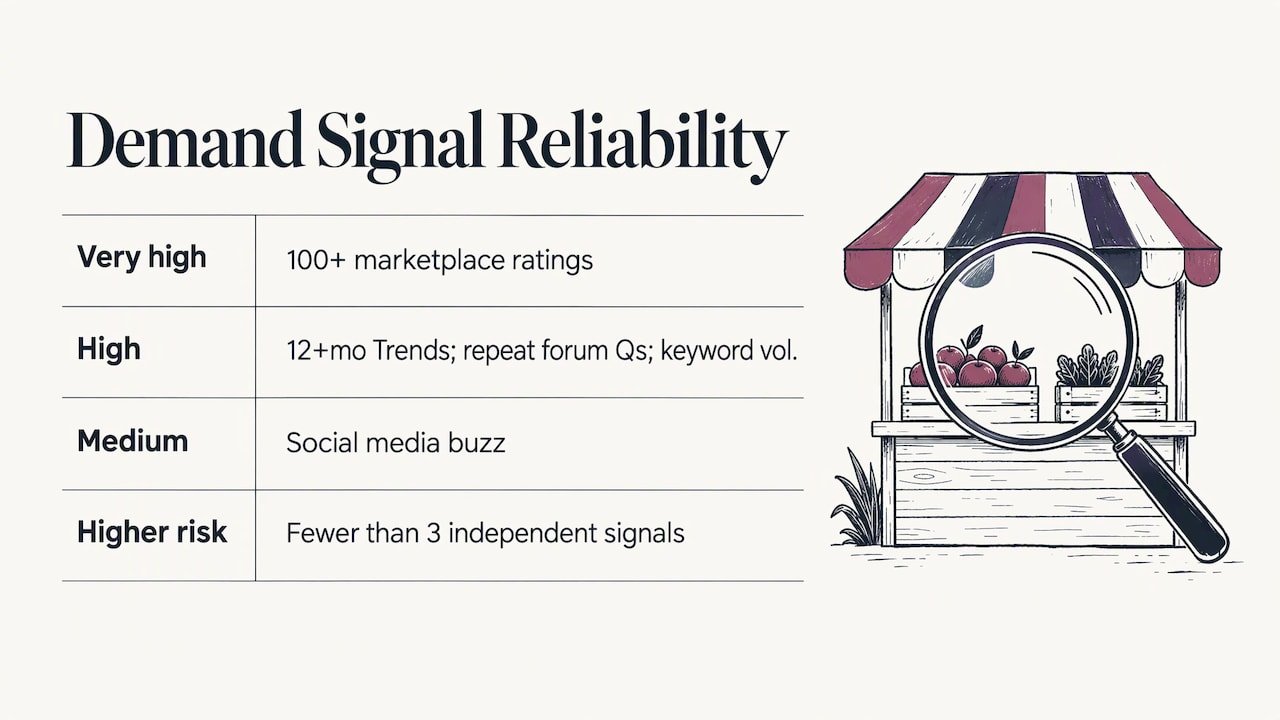
InsightRaider’s market research framework ranks demand signals by reliability. Sustained interest in Google Trends over 12 months or more, repeated questions on Reddit and forums, and keyword tool volume all rate high. Products with 100 or more ratings on a creator marketplace rate very high. Social media buzz rates medium. If you find fewer than three independent signals, the framework treats the idea as higher risk.
The same source makes a point worth remembering: polished covers and long descriptions on competing products show that sellers are responding to demand, not that demand exists. What counts is buyers asking, searching, and rating.
Quick ways to test an idea
- Read competitors’ reviews. Crevio’s guide recommends reading the 1- and 3-star reviews of similar products. They tell you what buyers wish had been included.
- Poll your audience. Ask two or three specific questions in your newsletter or social feed.
- Pre-sell or build a waitlist. Roctify and Crevio both suggest this. If nobody pays or signs up, you have saved yourself a month.
- Run a landing page test. InsightRaider describes an opt-in rate above 10% as a strong signal to build.
Easy first products to create
Keep the first version small enough to finish in a week. Framekit’s examples of a first-version scope are 8 to 12 Lightroom presets, 5 to 10 template layouts, or a 20 to 40 page ebook. Stripe suggests similar starter projects: a Canva or Google Docs template, a mini-course recorded on your phone, or an app that solves one problem. A short, finished product beats a big unfinished one every time, and you can add to it later.
Step by step: from idea to first sale
The sequence below blends the seven-step process in Framekit’s guide with the ten-step workflow in Kartra’s research summary, trimmed to what matters for a beginner.
- Name the buyer problem. Write one sentence: who is this for, and what will they be able to do afterward?
- Define the smallest complete result. Not everything you know, just the part that fixes the problem.
- Validate before building. Use a pre-sale, poll, or landing page as above.
- Build a small finished version. Aim for about a week of work.
- Choose where to sell. The next section covers this.
- Price with fees in view. Check what the platform and payment processor keep.
- Set up checkout and delivery. Automatic download links and a thank-you email are the minimum. Stripe notes that tools such as Zapier can automate instant download links, drip-fed course content, and thank-you emails.
- Decide your tax and refund policy. Write it down before the first order.
- Write the post-purchase emails. Delivery, a how-to-start note, and a request for a review.
- Launch to people who already follow you.
Where your first sale really comes from
SiteGround Academy’s guidance, summarized in the Framekit research, is that your first sale will almost certainly come from your existing network. Tell five to ten people directly, by name. Offer a small early-bird discount. Turn their feedback into social proof, and start an email list before launch day. Hoping strangers will find a brand-new listing rarely works.
Where to sell: marketplaces versus your own store
You can sell through a marketplace, through your own store, or both. Systeme.io lays out the trade-off clearly. A marketplace gives you built-in buyers who are already searching, but it owns the customer and takes a cut of every sale. Your own store gives you full control of branding and upsells, and you own the customer relationship.
| Marketplace | Your own store | |
|---|---|---|
| Traffic | Built in | You bring it |
| Fees | Commission on each sale | Monthly plan or payment fees |
| Customer data | The marketplace owns it | You own the email list |
| Branding and upsells | Limited | Full control |
| Best for | Discovery and validation | Repeat business and higher-value offers |
Easy Digital Downloads points out that a self-hosted WordPress store avoids per-sale platform fees, though you take on the setup. SureCart adds that hosted store builders charge a monthly subscription whether or not you sell anything, and advises using marketplaces for discovery and validation before moving more sales to your own store over time.
Matching product to channel
SendOwl’s guide maps product types to channels. Printables and planners suit craft marketplaces. Notion and Airtable templates suit template galleries and creator platforms. Design assets suit design marketplaces. Ebooks fit creator platforms and the big online bookstore’s self-publishing program. Courses fit creator and course platforms, and memberships belong on your own store, because recurring billing and community are tied to your brand.
For most beginners, a simple creator platform that handles checkout and file delivery is the fastest way to a live listing. Stripe recommends that approach for getting a product live in a few clicks.
Pricing and promoting your product
Price on the value of the result, not the number of pages. Then adjust for fees and for how well known you are.
- Start low if you are unknown. Salesforce advises that if you are not already a recognized name in your niche, you should build social credibility through reviews from genuine customers with verified public profiles. A low but reasonable launch price helps you collect those first reviews.
- Use an early-bird window. InsightRaider’s pricing guide suggests 40 to 50% off on days 1 to 3, 20 to 30% off on days 4 to 7, and full price from day 8.
- Anchor with a premium tier. The same guide explains that a $149 premium package can make a $39 option feel like a bargain.
- Be careful with pay-what-you-want. InsightRaider’s sales page research found it drives 8% more sales, but the average price falls 65% when there is no visible suggested price.
- Protect your rating. The same article reports that top creator-platform earners hold an average of 4.4 stars or higher, while ratings below 3.5 correlate strongly with zero lifetime revenue.
For promotion, pick one channel and one email list. Crevio frames the winning loop as traffic from an email list or a single social channel, going to a product that a specific group needs.
What you will actually keep: fees, refunds, and tax
The sticker price is not your income. Crevio puts platform fees at roughly 6% to 15% of revenue at small volumes. On a $47 template, a 15% total cost leaves $39.95 before any marketing, using simple arithmetic. Refunds, ads, software, and support come out of that too. Craftgineer recommends calculating your own margin from your real costs, including platform and payment fees, advertising, taxes, refunds, software, support and overhead, rather than assuming a universal percentage.
Why “passive” needs a footnote
Craftgineer also stresses that digital downloads are not truly passive. Design, testing, listing, marketing, customer support, compatibility updates, bookkeeping, and refunds all take time. Revenue can also stop because of platform rules, licenses, competition, or trend shifts. That is no reason to hold back. It is a reason to build products you can maintain and to keep your own email list, so one platform change does not end your income.
U.S. sales tax
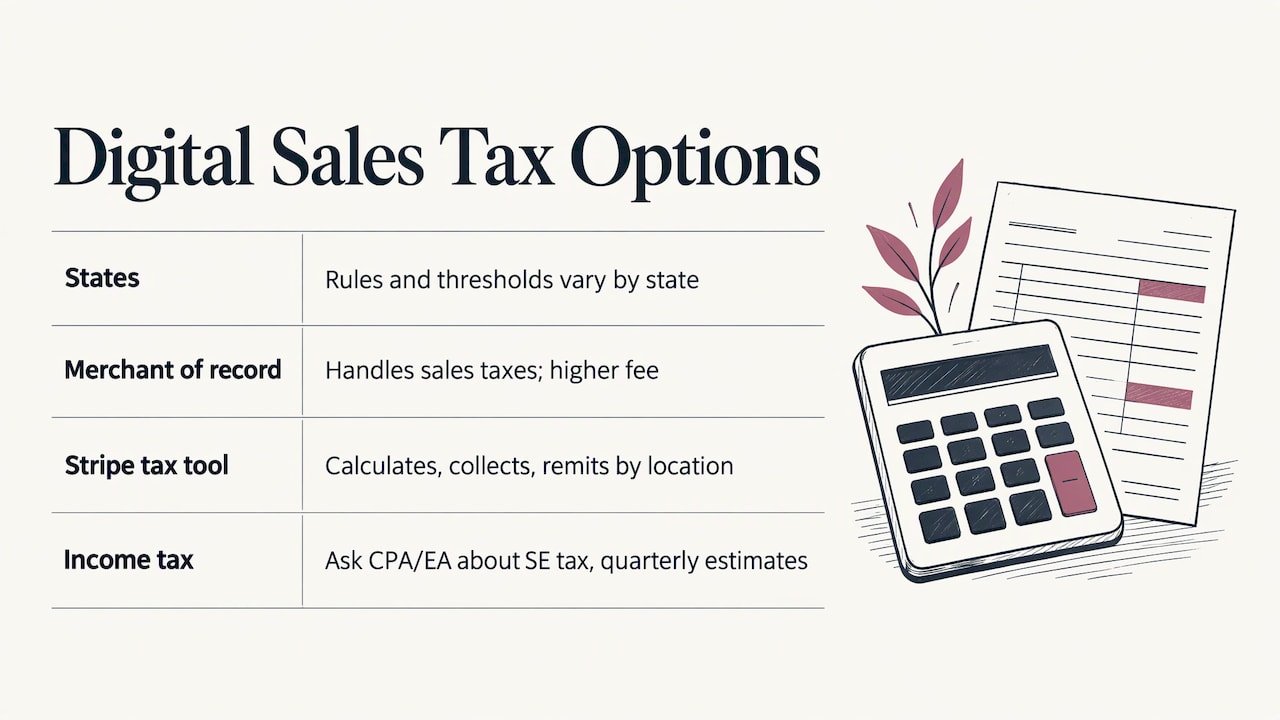
In the United States, sales tax on digital products depends on the state: some states tax digital downloads and others do not, and thresholds apply before you must collect. Roctify adds that a merchant of record, such as a platform that becomes the legal seller, handles those taxes for you in exchange for a higher fee. Stripe notes its tax tool can calculate, collect, and remit taxes based on the customer’s location. For your own income tax, talk to a CPA or enrolled agent about self-employment tax and quarterly estimates for your situation.
Licenses, refunds and claims
Observed.org advises sellers to state personal or commercial use, no-resale terms, and refund terms clearly. Keep receipts and license terms for every third-party asset such as stock photos, fonts and music. The same source suggests a short license people actually read protects you better than a long one nobody opens. If you sell a membership that renews automatically, make renewal terms and cancellation simple. If you describe results, be able to back them up.
Growing after launch
Once you have sales, use the data. Salesforce advises checking website and social analytics for customer patterns and cross-referencing them with customer feedback. It also recommends bundling, such as a course with the templates used in it, because there are no unit costs once each product exists. Ask buyers what they wish the product did, then turn the top request into version two or a companion product.
Our perspective
We review income platforms and side hustles every day, and the pattern is consistent: the people who do well start small, verify before they commit, and learn from someone a few steps ahead of them.
Digital products fit that approach well. A guide, a template pack or a small membership lets you test an idea with little risk, and the lessons carry into whatever you build next. We built Hustle Signals around vetting opportunities and pairing education with actionable strategies, because blind risk is what costs beginners the most.
That is also why we put weight on mentorship and community. Our VIP members share documented results and talk through what is working, so a new seller does not have to guess at pricing, platforms or launch tactics alone. If you are serious about building reliable online income, pair your first product with people who have been through it.
the author
Get help building your first income stream
If you want guides you can act on today, we publish premium digital products such as eBooks and PDF guides on building online income. We also run the HUSTLR VIP Circle, a paid community with mentorship, insider opportunities, and earning systems. Pricing and current details are on the Hustle Signals site.
If you are still comparing other ways to earn alongside a product, our guide to fast-money side hustles is a good place to browse.
FAQ
Is it profitable to sell digital products?
It can be, because there are no unit costs once a product is made, and bundles add revenue without extra production. Your real margin depends on platform fees, refunds, marketing, and taxes, so calculate it from your own costs. Income also tends to grow with an audience and an email list rather than appearing overnight.
What is the best way to start selling digital products as a beginner?
Pick one small product your audience has already asked for and test it with a pre-sale or waitlist. Build a short, finished version in about a week, list it on a platform that handles checkout and delivery, and tell people who already follow you. Collect reviews from those first buyers.
What is the most profitable digital product to sell?
No single format wins for everyone. Price ranges are wider for courses, cohort programs, and memberships than for printables or templates, but they also need more trust and support. Start with the format you can finish and support well, then move up as your audience grows.
Do I have to collect sales tax on digital products?
It depends on the state, the type of product, and your sales volume, since some states tax digital downloads and others do not. A merchant of record can handle collection and remittance for a higher fee. A CPA or tax professional can tell you what applies to you.